


Kinvoca Switch Controller for Nintendo Switch Handheld Mode, Ergonomic Grips and Joy Pad Pro, Supports Motion Control and Dual Shock
Description
Full description not available



Specifications
| Button Quantity | 16 |
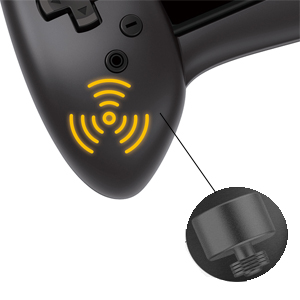
| Additional Features | Rumble, Touchpad |
| Power Source | Battery Powered |
| Hardware Platform | nintendo switch |
| Controller Type | Joystick |
| Connectivity Technology | Interface,Play,Type C,Wired,Plug |
| Compatible Devices | Nintendo Switch |
| Item Dimensions | 10.63 x 2.56 x 5.16 inches |
| Package Quantity | 1 |
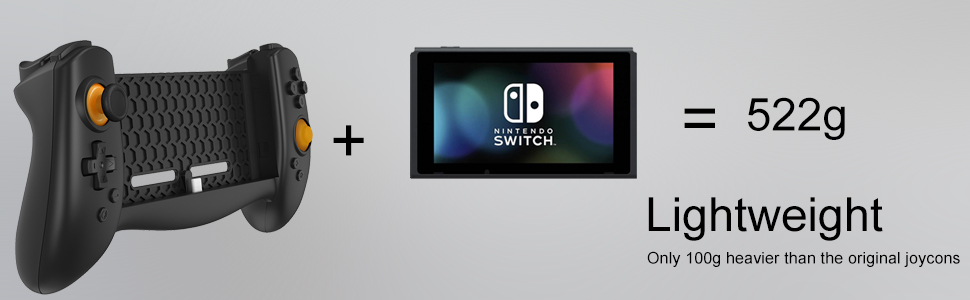
| Item Weight | 316 Grams |
Reviews
R**2
Lacks instructions, but works well once you get it work
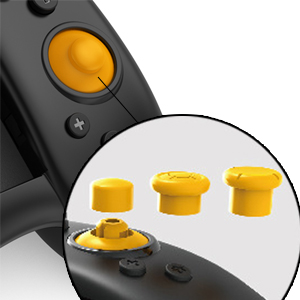
This is a good way of reducing the battery strain on your joycon. The first thing is that this did NOT come with any real instructions so I had a bit of a hard time getting this to work. Thankfully after some fiddling it got it work. One thing to note about this is that this is NOT wireless by any means. It must be directly connected to your switch in order to work. That being said, you need to make sure you turn on the wired connection first. Without this connect, it will not work. I have placed the instruction on where to go to turn it on. You need to go to System Setting --> Controllers and Sensors --> Pro Controller Wired Communication --> ON. The default is off so you need to make sure this is on BEFORE you plug this in. If you turn this on while plugged in, you will need to remove the switch and plug it back in. The device has no battery so you do not have to worry about it needing to be charged or anything. It runs solely off the power from the switch. Be careful when inserting the switch. It is a tight fit and you do not need to force it in at a bad angle. This would get your switch stuck and hard to remove. If you want to release the switch, you just need to press the latch on the back of the left side and pull up. It make take a little force to do so. Again make sure the Pro Controller Wired Communication is ON before you plug your switch in. Once you have it plugged in, it should be good to go. It does allow you to charge your switch through this if you are running low on power. Please note that there is a few seconds of disconnection when you plug in your switch. It is maybe two to three seconds. The switch does not 100% go all the way down. About 1/4 of it stands out from this controller. It has a good ventilation for the switch but you will still get the same warm feeling when you are using it for long term and charging it. In terms of how it feels, I think it does take a little getting used to. My pointer finger took some time to get used to pressing the R1 and L1. The reason being the handles are really big so my default feel was to put my pointer finger on R2 and L2 since that was my most comfortable position. Once I got used to the new position it was fine. The joy sticks are pretty sturdy. The right joystick stick can be removed and replaced with larger thumb pads if needed. It is pretty responsive and there is little to no lag (some people may say they see it VERY slightly but I do not). I just stick with the default. The buttons are pretty responsive although the bottom buttons can be a little hard to see so I get those mixed up and end up taking screen shots or pressing home button. The button response is pretty good. I played games like smash brother on this and it worked fine. The button response was good and I was able to still do combos on this. The case material does feel a little cheap and a bit big but comfortable. It does get scuffed up a bit easy. Overall this is a good device to have if you want a bit more feel to the controller and reduce the strain on your joy cons. The down side of this is that the instructions were not there and I had a REALLY hard time getting it work. Hopefully the instructions above help you set up this controller. The black and orange color looks great.
R**R
Far superior to the official Nintendo Brand. The best portable only Joy Con Controller to own!
First off I must say the joy con controller is not suitable for people who want to detach joy cons and play wireless because the unit pictured is one solid piece. The controller attachment does not need to be charged because it is not wireless in any way. It's not heavy and feels like I'm holding a controller even after an hour. I've been using the controller for 3 days on and off while taking breaks from work. I'm about halfway through Super Mario Galaxy in Super Mario 3D All Stars since I originally played back whenever I first played the Wii in 2007. I forgot just how good that game was, and I love how Nintendo incorporated tilting the screen for motion controls and pushing the y button for the spin move. However, that's a review for another day.With that out of the way:THE RUMBLE IN THE JOY CONS IS FAR SUPERIOR THAN THE ORIGINAL JOY CONS. Nintendo's official joy cons are incredibly disappointing for someone like myself who has been using vibration controllers since their first introduction with the n64 and ps1 during the 1990s. The feedback inside Nintendo's official joy cons are about as strong as a typical android smartphone, and recreates the annoying buzzing sound. The vibration feedback inside the Kinvoca joy cons is on par to a Sony controller and just feels right. Trust when I say you'll want to at least give this product a try and feel the difference for yourself.The DIRECTIONAL D-PAD IS BACK!!!! I hate that Nintendo decided to use buttons for up, down, left, and right instead of having a traditional directional pad. The directional pad in the Kinvoca is responsive and works as normal. Once again I must say the D Pad used on the Kinvoca is what should have been on NIntendo's official left joy con controllers.THE RIGHT STICK HAS A C-Stick! While I'm not a fan of the Gamecube controller the C-stick on the Gamecube controller is the one thing that Nintendo corrected after the Nintendo 64 controller. If you'd prefer an analog stick, one has been icluded in the packaging. The C-Stick can easily be detached to attach the extra analog stick included in a matter of seconds. This will certainly come in handy whenever Nintendo finally decides to release the n64 and gamecube games to their online eShop webstore and feels natural while playing all the games with Super Mario 3D All Stars(not included with this listing).L2 and R2 feel pretty nice with a ps4 design that is concave to prevent your fingers from slipping off the buttons. Once again proving this controller is superior to the official joy con controllers.LESS THAN HALF THE PRICE OF OFFICIAL JOY CONS AND NO DRIFT. The reason I needed to purchase joy cons originally is because the official Nintendo joy cons that come with our video game system have the drift issue and need to be repaired. Nintendo's repair service is offering limited service because of the pandemic as of writing this review in June 2021. I've been placed on a waiting list but in the meantime needed to find a replacement. If you're still reading my comment I don't know what else to say. For my money I'd rather own the controller because the rumble. It really is a game changer no pun intended.P.S. Another minor bonus is the screen is slighly elevated because of the attachment's design which means I don't have to tilt my head down as far. This comes in handy whenever I play inside my vehicle.
A**Z
Amazing controler!
The first one I got was defective and didn't work but the seller, Airunmi, responded to my email immediately and I had a new one in a day after submitting the return to amazon.Instructions: go into the settings and turn on the "Pro controller WIRED connection" option then insert the console into the controller. It functions as a wired controller and plugs into the USB-C port on the bottom.THE CONTROLLER DOES NOT NEED TO BE CHARGED. But it has a port to plug in the charging cord so you can charge the console while gaming which is amazing considering how much faster you use the battery when using the handheld mode.I just hooked up the new one and it works great!! I even love the alternative placement of the plus and minus buttons it makes more sense having them down at the bottom. it will probably take some getting used to. Also, they have 3 different button types for the right analog stick which is nice. The plastic feels very sturdy and not cheap. It also holds the system more securely so that it doesn't wobble around like it can with the joy con controller. I'm looking forward to many years of play with this controller!
Common Questions
Trustpilot
1 day ago
3 weeks ago


Desert Online General Trading LLC
Dubai, United Arab Emirates